Our studies require editing Sanskrit text in Devanāgarī (देवनागरी) and the IAST scripts. Below is a cheatsheet to help with this.
Concepts
Conceptually there are two mechanisms to input text.
- Use a keyboard layout. All of us are familiar with this. Default keyboard layout (US international or similar) corresponds to the keys in the physical keyboard. You could use a keyboard layout and map the physical keys into the Devanāgarī characters.
- Or, you could use a Transliteration scheme where you type ASCII
characters in your existing keyboard layout and a special software called
Input Methods framework transliterates that into Devanāgarī. E.g., with
Harvard-Kyoto transliteration scheme you type
khaand you getख.
We highly recommend the excellent Fcitx5 input method for Linux. It supports both keyboard layouts and rule based transliteration schemes. This tool effectively enables us to type IAST and Devanāgarī in any text box. The m17n project provides a database for Multilingualization (m17n) or transliteration schemes. You can point Fcitx5 to these with fcitx-m17n.
Configuring Fcitx5
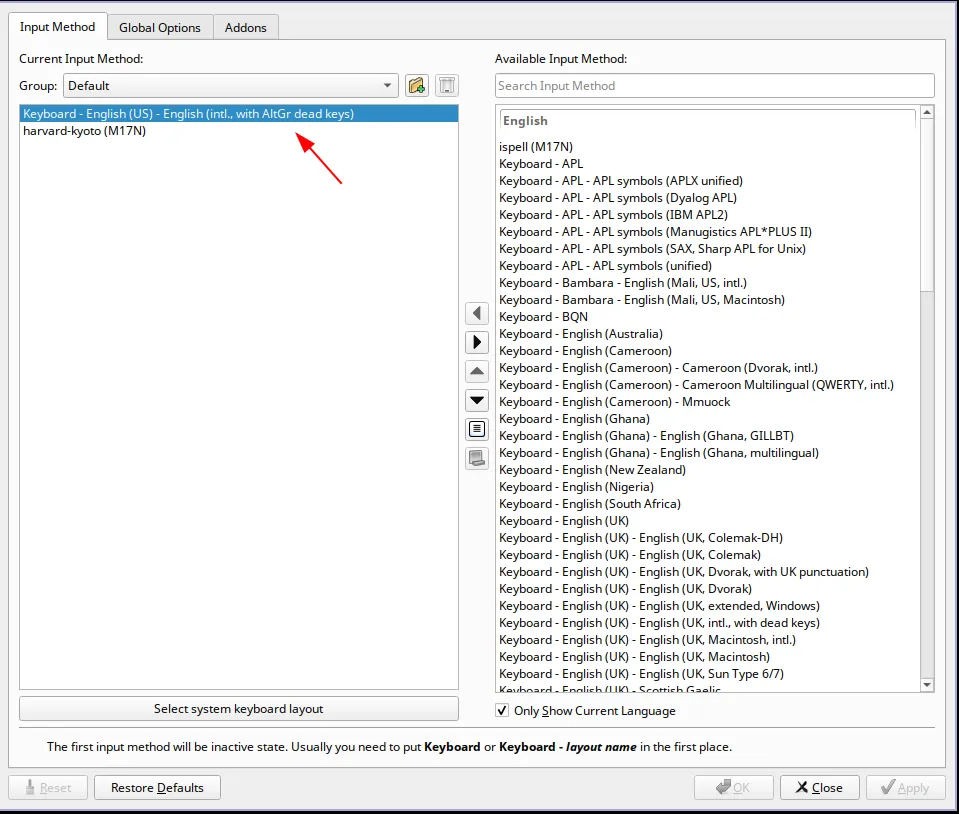
As usual, the Archlinux wiki provides a fantastic guide for setup. Also see https://fcitx-im.org/wiki/Setup_Fcitx_5. Use fcitx5-configtool for a GUI based setup, screenshot below.
Typing in IAST can be done using a transliteration scheme or a keyboard
layout. We recommend latter for fast typing response. Use the
Keyboard - English (US) - English (intl., with AltGr dead keys) keyboard
layout. This smart layout allows you to input ASCII text as usual, and leverages
the dead keys withRight Altmodifier to input special text likeāforआ.
Typing in Devanāgarī is achieved through the Harvard-Kyoto transliteration scheme. You can pick any scheme supported by m17n.
Key Shortcuts
US Intl with AltGr Dead Keys
Modified from https://dry.sailingissues.com/us-international-keyboard-layout.html for AltGr Dead Keys keyboard layout.
| Diacritic | Keyboard shortcut |
|---|---|
| ā | AltGr+Shift+3 + a |
| ś | AltGr+’ + s |
| ȧ | AltGr+. + a |
| ạ | AltGr+Shift+- + a |
| ã | AltGr+Shift+` + a |
Below diacritics are not used in IAST, provided for completion.
| Diacritic | Keyboard shortcut |
|---|---|
| à | AltGr+` + a |
| ä | AltGr+Shift+” + a |
| â | AltGr+6 + a |
| ă | AltGr+Shift+9 + a |
| ǎ | AltGr+Shift+. + a |
| ő | AltGr+Shift+2 + o |
| ą | AltGr+8 + a |
| å | AltGr+Shift+0 + a |
Vowels (śvara) and Codas
Modified from Wikipedia pages of IAST and Harvard-Kyoto. We’re using direct
Unicode keyboard shortcut Ctrl+Shift+u on Linux for certain characters.
| Devanāgarī | IAST | Harvard Kyoto | Key Shortcut |
|---|---|---|---|
| अ | a | a | |
| आ | ā | A | |
| इ | i | i | |
| ई | ī | I | AltGr+Shift+3 + i |
| उ | u | u | |
| ऊ | ū | U | AltGr+Shift+3 + u |
| ऋ | ṛ | R | AltGr+Shift+- + r |
| ॠ | ṝ | RR | Ctrl+Shift+u 1e5d |
| ऌ | ḷ | lR | AltGr+Shift+- + l |
| ॡ | ḹ | lRR | Ctrl+Shift+u 1e39 |
| ए | e | e | |
| ऐ | ai | ai | |
| ओ | o | o | |
| औ | au | au | |
| `ं | ṁ | M | AltGr+. + m |
| ः | ḥ | H | AltGr+Shift+- + h |
| `ँ | m̐ | Ctrl+Shift+u 0901 | |
| ऽ | ’ | .a | Ctrl+Shift+u 093d |
| । | | | Ctrl+Shift+u 0964 | |
| ॥ | ! | Ctrl+Shift+u 0965 | |
| ॐ | OM | Ctrl+Shift+u 0950 |
Consonants (vyañjana)
Map of Devanāgarī consonants with equivalent IAST or Harvard-Kyoto. Note only the differing Harvard-Kyoto keys are mentioned after the comma. This table is taken from the Wikipedia and enhanced with above.
| velars | palatals | retroflexes | dentals | labials | Category |
|---|---|---|---|---|---|
| क k | च c | ट ṭ, T | त t | प p | tenuis stops |
| ख kh | छ ch | ठ ṭh, Th | थ th | फ ph | aspirated stops |
| ग g | ज j | ड ḍ, D | द d | ब b | voiced stops |
| घ gh | झ jh | ढ ḍh, Dh | ध dh | भ bh | breathy-voiced stops |
| ङ ṅ, G | ञ ñ, J | ण ṇ, N | न n | म m | nasal stops |
| ह h | य y | र r | ल l | व v | approximants |
| श ś, z | ष ṣ, S | स s | sibilants | ||
| ळ ḻ, L | approximants (Vedic) |
Hope you enjoy this new Sanskrit editor setup 🕉️